If you want to find Instagram accounts connected to your own email, start with your inbox and Instagram’s official recovery options. You can also use the same audit methods to identify other services linked to that address, including subscriptions, shopping accounts, and newsletters.
The sheer volume of online services we interact with daily means it's easy to lose track. From streaming platforms and e-commerce sites to productivity tools and social networks, each often requires an email for registration. Over time, these individual sign-ups accumulate, creating a complex web of digital commitments that can be difficult to manage.
This hidden network of subscriptions not only impacts your monthly budget but also carries significant implications for your digital security and privacy. Unused or forgotten accounts can become vulnerabilities, making a thorough audit an indispensable exercise for any internet user. It's about regaining control over your digital life.
The Importance of a Digital Audit
Conducting a comprehensive audit of your email-linked subscriptions is far more than just a spring cleaning exercise; it's a critical step towards enhancing your digital security posture. Every forgotten account represents a potential entry point for malicious actors, especially if those accounts use old or weak passwords. Think of it as securing your digital home.
Beyond security, understanding your subscriptions also offers significant financial benefits. Many services offer free trials that seamlessly transition into paid subscriptions if not cancelled, leading to unexpected charges. Identifying and canceling these unwanted services can result in substantial savings over time, freeing up funds for more intentional spending.
Moreover, a digital audit empowers you to manage your online privacy effectively. Each service you sign up for collects data, and knowing which entities hold your information allows you to make informed decisions about data retention and privacy settings. This proactive approach ensures your personal data is only shared where you intend it to be.

Manual Search Strategies
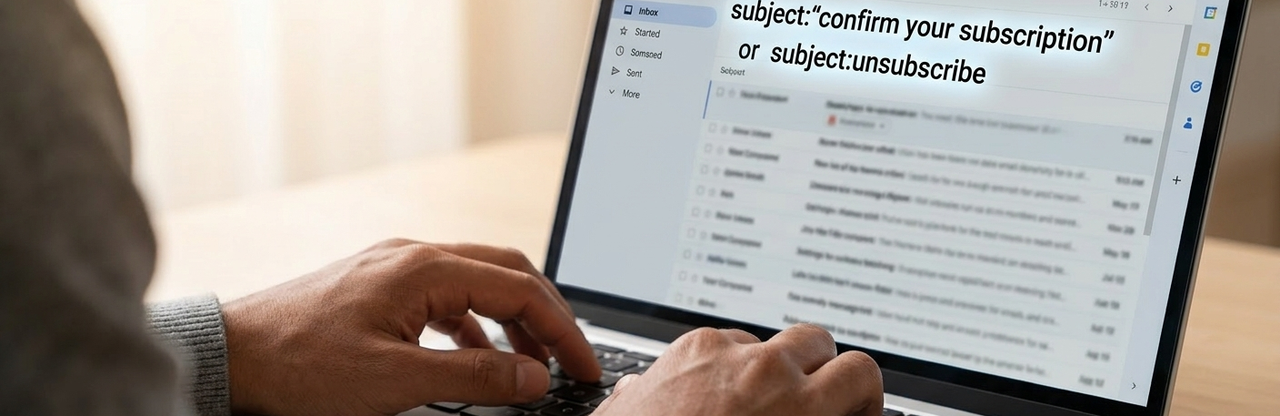
Starting with a manual search of your email inbox is often the most straightforward and effective method for uncovering subscriptions. Begin by searching for common keywords like "unsubscribe," "account," "welcome," "confirmation," "receipt," and "renewal." These terms are frequently found in automated emails from services you've signed up for.
Dedicate time to scroll through older emails, particularly those from several years ago. It’s surprising how many services we sign up for and then forget, especially if they were related to a past project, hobby, or a one-time purchase. This historical review can unearth dormant accounts that still hold your personal data.
Consider creating a dedicated folder in your email client for subscription-related emails as you find them. This organization will not only aid in your current audit but also simplify future monitoring. A structured approach ensures no stone is left unturned in your quest for digital clarity.
How to Check Whether an Instagram Account Is Connected to Your Email
If you are checking your own email address, you can look for Instagram-related messages without accessing anyone else’s account. Search your inbox for from:instagram.com, Instagram, confirm your email, security code, new login, and password reset. Review the sender, date, and links carefully because a message may relate to an old, disabled, or compromised account.
Useful Gmail searches include from:(mail.instagram.com OR instagram.com), subject:(Instagram OR security OR confirmation), and after:2020/01/01 Instagram. Outlook and other email providers offer similar sender, subject, and date filters. Adapt the date and sender filters to your own inbox and the period you want to review.
Use Instagram’s Official Account-Recovery Flow
If you own the email address, visit Instagram’s official login or account-recovery page and choose the option to get help logging in. Enter your email address only on Instagram’s official domain and follow the instructions shown. Instagram may identify an associated account or send a login link, but results can vary if the email was never verified, the account uses another email, or the address has been changed.
Privacy boundary: An email address alone is not a reliable or appropriate way to discover another person’s private Instagram account. Do not use scraping services, leaked databases, password-reset abuse, or tools that claim to reveal hidden accounts. Check only accounts and email addresses you own or have permission to investigate.
Confirm that messages come from an authentic Instagram domain, never share a security code, do not click unexpected password-reset links, and access Instagram by typing the official site or using its official app. If you see an unfamiliar login or account, secure your email first and change reused passwords.
After identifying the account or service, review its privacy settings, enable two-factor authentication, and delete accounts you no longer use. For broader guidance, see Best Practices for Subscription Management.
Leveraging Email Search Filters
Most email providers, such as Gmail, Outlook, and Yahoo Mail, offer search filters that can streamline your investigation. Use advanced options to filter by sender, date range, or emails containing specific attachments. These filters help isolate subscription-related communications.
For example, you can filter emails that contain the word "subscription" but exclude emails from your immediate contacts. Similarly, searching for emails with "invoice" or "billing" in the subject line can quickly highlight services that are incurring costs. Experiment with different combinations to refine your search results.
These advanced filters act as a digital sieve, allowing you to sift through years of correspondence efficiently. By systematically applying these tools, you can dramatically reduce the time spent manually scanning and increase the accuracy of your findings, ensuring a more complete picture of your digital commitments.
Utilizing Third-Party Subscription Management Tools
Several third-party applications are specifically designed to help you identify and manage your subscriptions. Services like Trim, Truebill (now Rocket Money), and Bobby (for iOS) connect to your bank accounts and credit cards to detect recurring charges, then link them back to potential subscriptions. These tools offer a financial perspective on your digital footprint.
Other tools, such as Unroll.me, focus on email-based subscriptions. By granting them access to your inbox, they scan for marketing emails and newsletters, presenting you with a consolidated list of your email-based subscriptions. This can help organize newsletters, but it is not a reliable method for identifying social-media accounts.
These tools generally identify newsletters or recurring payments; they cannot reliably reveal every social-media account associated with an email. Avoid any service claiming it can expose private Instagram accounts, and never provide it with your Instagram password or authentication codes. Before connecting any tool to financial or email data, research its privacy policies and security practices.
Reviewing Payment Histories
Your bank statements and credit card transaction histories are invaluable resources for uncovering paid subscriptions. Many services operate on an auto-renewal basis, and these charges will appear as recurring debits. Carefully review your statements for unfamiliar or consistently appearing transactions.
Look for small, recurring charges that might go unnoticed amidst larger expenses. These could be anything from obscure app subscriptions to forgotten cloud storage plans. Cross-reference these charges with your known subscriptions to identify any discrepancies or services you no longer use.
This financial audit often reveals subscriptions that email searches might miss, especially if the service's communications have been filtered into spam or deleted. It provides a concrete, financial trail of your digital commitments, highlighting areas where you might be unknowingly spending money.
Checking Web Browser Saved Passwords
Your web browser often saves login credentials for various websites and services, which can be a treasure trove of forgotten accounts. Access your browser's password manager (e.g., Google Chrome's Password Manager, Firefox Lockwise, Safari Keychain) to view a list of sites where you have saved login information.
This list provides a direct link to services you've interacted with, even if you don't receive regular emails from them. For each entry, you can typically see the website URL and the associated username, which is often your email address. This offers a quick way to recall services you might have overlooked.
Consider this step as a digital archeological dig, unearthing relics of your past browsing habits. It's a pragmatic approach to reconstructing your digital presence, ensuring that no active or dormant account slips through the cracks.
The Role of Digital Estate Planning
Understanding your digital footprint extends beyond current management; it also involves planning for the future. Digital estate planning ensures that your online accounts and data are handled according to your wishes after you're no longer able to manage them. This is particularly relevant when considering the vast array of subscriptions and digital assets tied to your email. For further reading on this crucial topic, consider exploring Understanding Digital Estate Planning.
Effectively managing your digital legacy requires a clear inventory of all your online accounts, including subscriptions. This inventory helps designated individuals access or close accounts, ensuring personal data is protected and valuable digital assets are preserved. It’s a proactive step in securing your digital future.
This task can seem overwhelming given the sheer number of digital touchpoints we accumulate. For individuals seeking a comprehensive service solution to navigate the complexities of digital estate planning, Cipherwill offers robust tools and guidance. They provide an intuitive platform to organize, manage, and securely plan for your digital assets, offering peace of mind that your digital legacy is in capable hands.
Best Practices for Subscription Management
Once you've identified all your subscriptions, implementing best practices for ongoing management is crucial.
- Regular Audits: Schedule quarterly or bi-annual reviews of your subscriptions and payment statements. This proactive approach helps catch new or unwanted services before they become entrenched.
- Dedicated Email Address: Consider using a secondary email address for newsletters, promotional offers, and less critical sign-ups. This keeps your primary inbox clean and focused on essential communications.
- Strong, Unique Passwords: For every service you keep, ensure you're using a strong, unique password, ideally generated by a password manager. This mitigates the risk of a breach on one service compromising others.
- Two-Factor Authentication (2FA): Enable 2FA on all supported accounts, especially those containing sensitive personal or financial information. This adds an extra layer of security against unauthorized access.
- Review Privacy Settings: Periodically check the privacy settings of your active subscriptions. Adjust them to minimize data sharing and ensure your preferences align with your comfort level.
- Cancel Unused Services Promptly: Don't procrastinate. If you identify a service you no longer need or use, cancel it immediately to avoid unnecessary charges and reduce your digital footprint.
- Monitor for Data Breaches: Stay informed about data breaches at companies you have accounts with. Services like Have I Been Pwned? can alert you if your email address has appeared in known breaches.
Risks of Unmanaged Subscriptions
The perils of neglecting your digital subscriptions are multifaceted and can have significant repercussions. Foremost among these is the heightened risk of security breaches. Each forgotten account, particularly those with weak or reused passwords, serves as a potential gateway for cybercriminals to access your personal data, leading to identity theft or financial fraud.
Financially, unmanaged subscriptions can quietly drain your bank account. Recurring charges for services you no longer use, or never intended to pay for after a free trial, can accumulate into substantial losses over time. These "ghost subscriptions" are a common source of financial leakage for many individuals.
Furthermore, an excessive number of active subscriptions can lead to significant privacy concerns. Each service collects and stores your data, and the more services you have, the larger your digital footprint becomes. This increases the likelihood of your data being compromised in a breach or being used in ways you didn't consent to.
Strategies for Reducing Digital Clutter
Reducing digital clutter is an ongoing process that requires intentional effort. Start by creating an inventory of all identified subscriptions, categorizing them into "Keep," "Cancel," or "Investigate Further." This systematic approach provides clarity and a clear action plan.
For services you decide to keep, consolidate where possible. For instance, if you have multiple cloud storage solutions, evaluate if one can meet all your needs. This not only simplifies management but can also lead to cost savings. The goal is to streamline your digital ecosystem.
Finally, adopt a "digital minimalism" mindset. Before signing up for any new service, ask yourself if it's truly essential. Be mindful of free trials and set reminders to cancel if you don't intend to continue after the trial period. Proactive management is key to maintaining a clean and secure digital life.
Automating Subscription Monitoring
While manual checks are essential, automating some aspects of subscription monitoring can provide continuous oversight. Many financial institutions offer tools within their online banking platforms to track recurring payments. Familiarize yourself with these features to set up alerts for specific transaction types or amounts.
Consider using dedicated subscription management apps that integrate directly with your financial accounts. These apps can automatically detect recurring charges and often provide options to cancel services directly through their platform. This can save significant time and effort compared to manually contacting each service provider.
However, remember that automation doesn't replace vigilance. Regularly review the reports and alerts generated by these tools. Technology can assist, but your active oversight remains the most critical component in ensuring your digital subscriptions are managed effectively and securely.
FAQs
Q: Why is it important to find all subscriptions linked to my email?
A: It's crucial for several reasons: enhancing digital security by closing unused accounts that could be vulnerabilities, saving money by canceling unwanted recurring charges, and improving privacy by knowing which entities hold your personal data.
Q: What are the most common ways subscriptions get linked to an email?
A: Subscriptions are most commonly linked through direct sign-ups on websites or apps, free trials that convert to paid services, newsletter sign-ups, and purchases from e-commerce sites that automatically create an account.
Q: Are there risks associated with using third-party tools to find subscriptions?
A: Yes, there are risks. Granting third-party apps access to your email or financial accounts requires trust. Always research their privacy policies, security measures, and user reviews to ensure your data is handled responsibly.
Q: How can I identify subscriptions that don't send emails or appear on bank statements?
A: These "hidden" subscriptions can often be found by checking your web browser's saved passwords, reviewing app permissions on your mobile devices, or by manually recalling services you've used in the past and checking their websites.
Q: What should I do if I find an unauthorized subscription?
A: Immediately cancel the subscription directly with the service provider. If it's a recurring charge, contact your bank or credit card company to dispute the transaction and block future payments. Change any associated passwords.
Q: How often should I review my subscriptions?
A: It's recommended to conduct a thorough review at least once or twice a year. However, regularly checking your bank statements and email for new or unexpected charges can help catch issues more quickly.
Q: Can old, unused subscriptions pose a security risk even if I don't use them anymore?
A: Absolutely. Dormant accounts can still hold your personal data. If the service experiences a data breach, your information could be exposed, even if you haven't logged in for years. Deleting unused accounts is best practice.
Q: What's the best way to unsubscribe from unwanted newsletters without marking them as spam?
A: Always look for the "unsubscribe" link, usually at the bottom of the email. Marking as spam can sometimes negatively impact sender reputation for legitimate emails, whereas unsubscribing is the cleaner method.
Q: Is it better to delete an account or just cancel the subscription?
A: If you have no intention of using the service again, deleting the account entirely is generally better for privacy and security. Canceling only stops billing, often leaving your account and data intact.
Q: How does digital estate planning relate to managing my current subscriptions?
A: Digital estate planning involves creating an inventory of all your digital assets and accounts, including subscriptions. This inventory is critical for ensuring that, in the event of your incapacitation or death, designated individuals can manage or close these accounts according to your wishes, protecting your digital legacy.
Q: Can I find someone’s Instagram account using their email address?
A: Not reliably, and you should not try to bypass Instagram’s privacy controls. For your own email address, search for Instagram emails and use Instagram’s official account-recovery flow. Avoid third-party lookup sites that request credentials, payment, or inbox access.
Q: Why can’t I find an Instagram account linked to my email?
A: The account may use a different email address or phone number, the email may not have been verified, the address may have been changed, or the account may have been deleted or disabled. Check older inboxes and aliases you own, then use Instagram’s official support process.